Microservices Distributed Tracing with X-Ray on AWS EKS
Step-01: Introduction
Introduction to AWS XRay & k8s DaemonSets
- Understand about AWS X-Ray Services
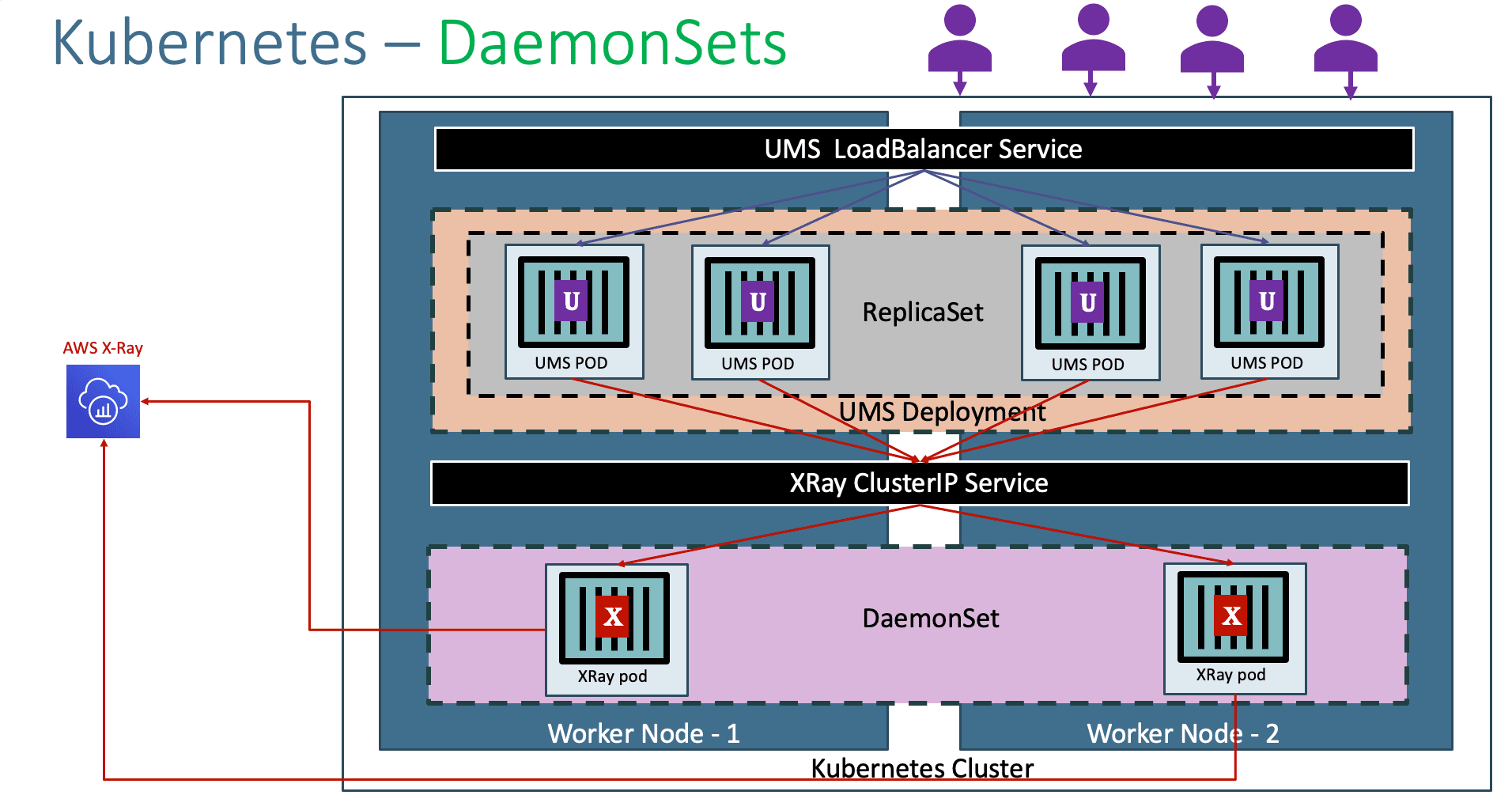
- Understand Kubernetes DaemonSets
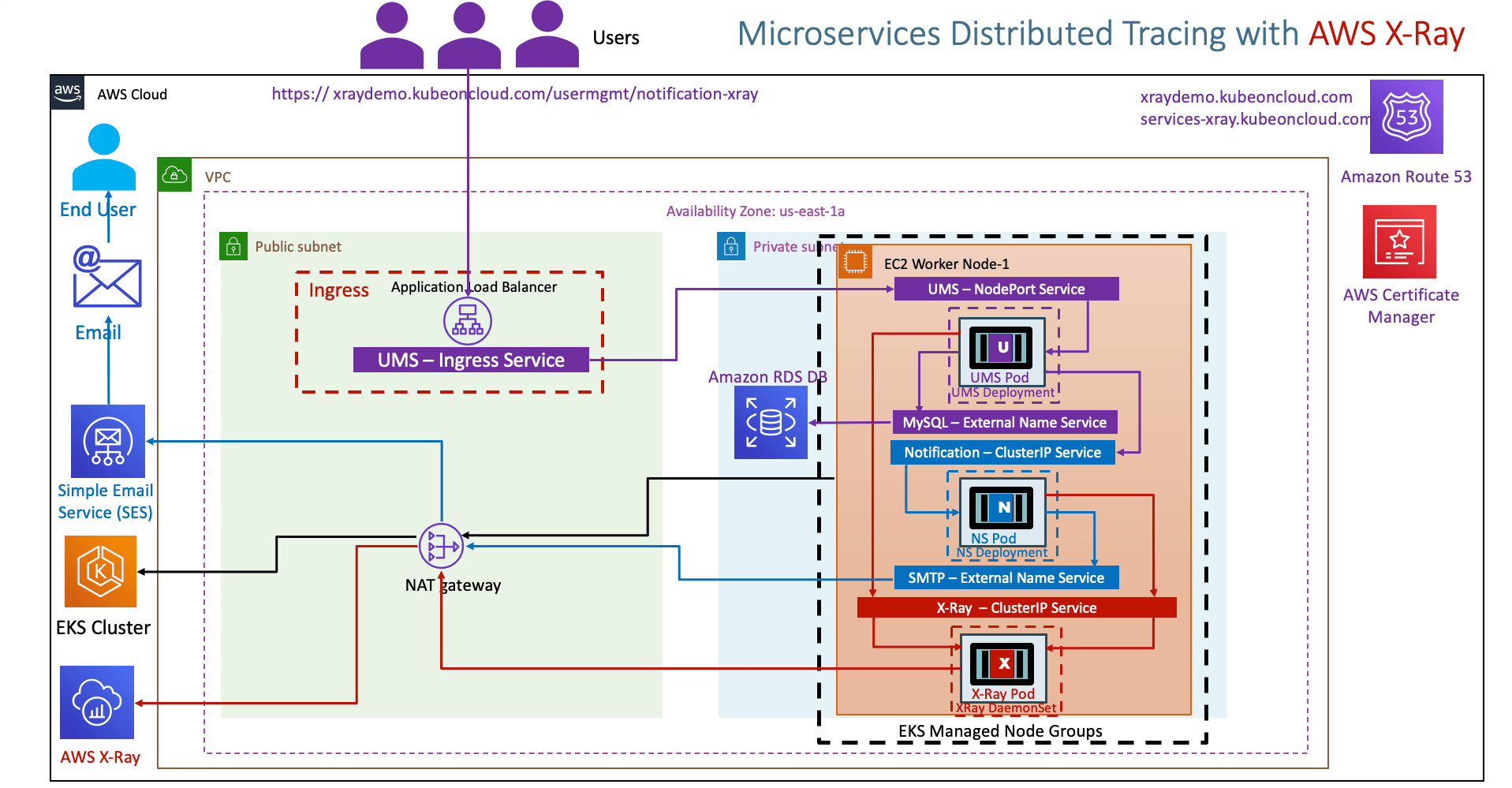
- Understand the AWS X-Ray and Microservices network design on EKS Cluster
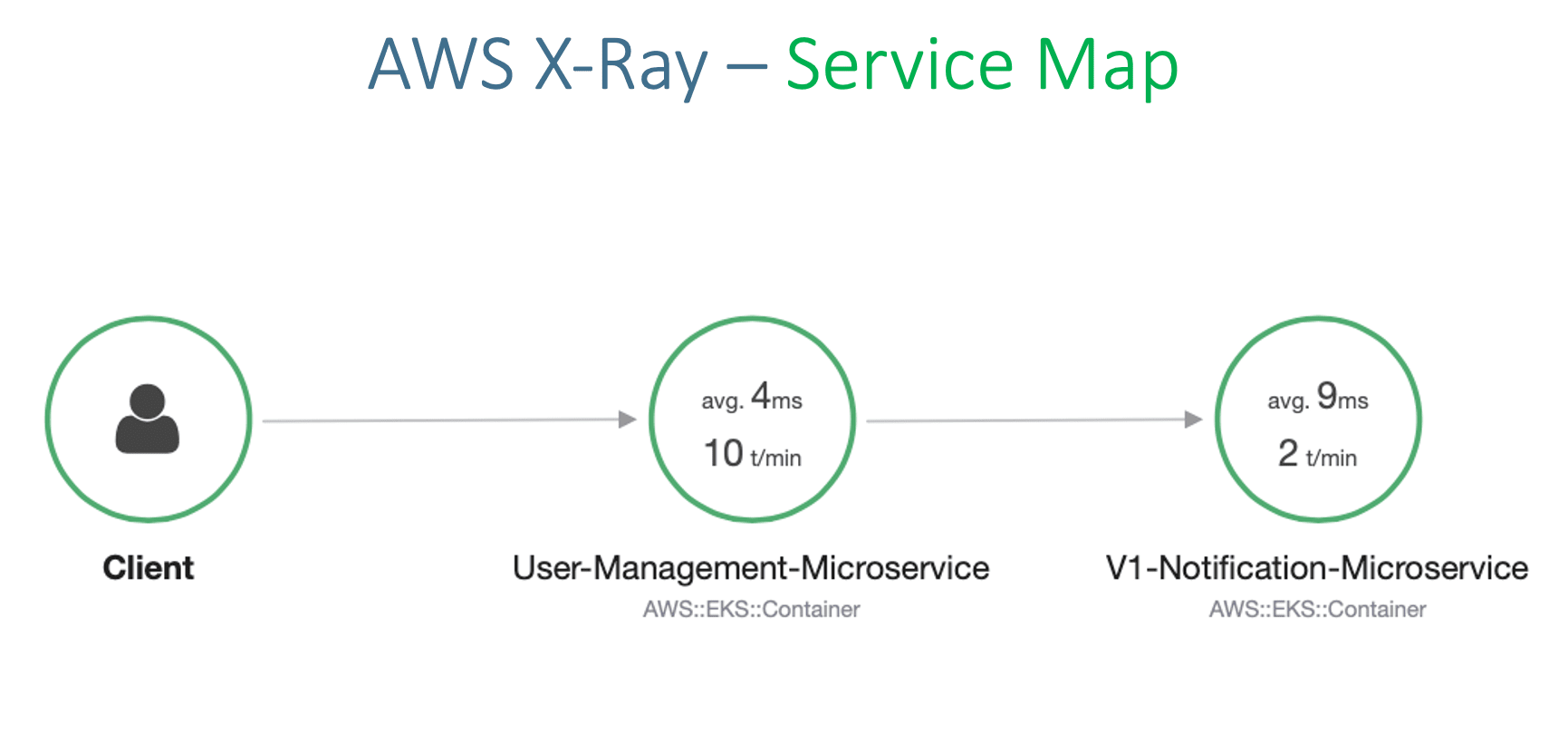
- Understand about Service Map, Traces and Segments in AWS X-Ray
Usecase Description
- User Management getNotificationAppInfo will call Notification service notification-xray which will evetually send traces to AWS X-Ray service
- We are going to depict one Microservice calling other Microservice
List of Docker Images used in this section
| Application Name | Docker Image Name |
|---|---|
| User Management Microservice | stacksimplify/kube-usermanagement-microservice:3.0.0-AWS-XRay-MySQLDB |
| Notifications Microservice V1 | stacksimplify/kube-notifications-microservice:3.0.0-AWS-XRay |
Step-02: Pre-requisite: AWS RDS Database, ALB Ingress Controller & External DNS
AWS RDS Database
- We have created AWS RDS Database as part of section 06-EKS-Storage-with-RDS-Database
- We even created a
externalName service: 01-MySQL-externalName-Service.ymlin our Kubernetes manifests to point to that RDS Database.
ALB Ingress Controller & External DNS
- We are going to deploy a application which will also have a
ALB Ingress Serviceand also will register its DNS name in Route53 usingExternal DNS - Which means we should have both related pods running in our EKS cluster.
- We have installed ALB Ingress Controller as part of section 08-01-ALB-Ingress-Install
- We have installed External DNS as part of section 08-06-01-Deploy-ExternalDNS-on-EKS
Step-03: Create IAM permissions for AWS X-Ray daemon
# Template
eksctl create iamserviceaccount \
    --name service_account_name \
    --namespace service_account_namespace \
    --cluster cluster_name \
    --attach-policy-arn arn:aws:iam::aws:policy/AWSXRayDaemonWriteAccess \
    --approve \
    --override-existing-serviceaccounts

# Replace Name, Namespace, Cluster Info (if any changes)
eksctl create iamserviceaccount \
    --name xray-daemon \
    --namespace default \
    --cluster eksdemo1 \
    --attach-policy-arn arn:aws:iam::aws:policy/AWSXRayDaemonWriteAccess \
    --approve \
    --override-existing-serviceaccounts
Verify Service Account and AWS IAM Role
# List k8s Service Accounts
kubectl get sa

# Describe Service Account (Verify IAM Role annotated)
kubectl describe sa xray-daemon

# List IAM Roles on eksdemo1 Cluster created with eksctl
eksctl  get iamserviceaccount --cluster eksdemo1
AWS EKS - Elastic Kubernetes Service - Masterclass
Step-04: Update IAM Role ARN in xray-k8s-daemonset.yml
Get AWS IAM Role ARN for xray-daemon
Update xray-k8s-daemonset.yml
- File Name: kube-manifests/01-XRay-DaemonSet/xray-k8s-daemonset.yml
Deploy X-Ray DaemonSet on our EKS Cluster
# Deploy
kubectl apply -f kube-manifests/01-XRay-DaemonSet/xray-k8s-daemonset.yml

# Verify Deployment, Service & Pod
kubectl get deploy,svc,pod

# Verify X-Ray Logs
kubectl logs -f <X-Ray Pod Name>
kubectl logs -f xray-daemon-phszp

# List & Describe DaemonSet
kubectl get daemonset
kubectl describe daemonset xray-daemon
Kubernetes Manifests
#02-UserManagementMicroservice-Deployment.yml
apiVersion: apps/v1
kind: Deployment
metadata:
  name: usermgmt-microservice
  labels:
    app: usermgmt-restapp
spec:
  replicas: 1
  selector:
    matchLabels:
      app: usermgmt-restapp
  template:
    metadata:
      labels:
        app: usermgmt-restapp
    spec:
      initContainers:
        - name: init-db
          image: busybox:1.31
          command: ['sh', '-c', 'echo -e "Checking for the availability of MySQL Server deployment"; while ! nc -z mysql 3306; do sleep 1; printf "-"; done; echo -e "  >> MySQL DB Server has started";']
      containers:
        - name: usermgmt-restapp
          image: stacksimplify/kube-usermanagement-microservice:3.0.0-AWS-XRay-MySQLDB
          ports:
            - containerPort: 8095
          imagePullPolicy: Always
          env:
            - name: DB_HOSTNAME
              value: "mysql"
            - name: DB_PORT
              value: "3306"
            - name: DB_NAME
              value: "usermgmt"
            - name: DB_USERNAME
              value: "dbadmin"
            - name: DB_PASSWORD
              valueFrom:
                secretKeyRef:
                  name: mysql-db-password
                  key: db-password
            - name: NOTIFICATION_SERVICE_HOST
              value: "notification-clusterip-service"
            - name: NOTIFICATION_SERVICE_PORT
              value: "8096"
            - name: AWS_XRAY_TRACING_NAME
              value: "User-Management-Microservice"
            - name: AWS_XRAY_DAEMON_ADDRESS
              value: "xray-service.default:2000"
            - name: AWS_XRAY_CONTEXT_MISSING
              value: "LOG_ERROR"  # Log an error and continue, Ideally RUNTIME_ERROR – Throw a runtime exception which is default option if not configured
          livenessProbe:
            exec:
              command:
                - /bin/sh
                - -c
                - nc -z localhost 8095
            initialDelaySeconds: 60
            periodSeconds: 10
          readinessProbe:
            httpGet:
              path: /usermgmt/health-status
              port: 8095
            initialDelaySeconds: 60
            periodSeconds: 10
---
# Kubernetes Secrets
apiVersion: v1
kind: Secret
metadata:
  name: mysql-db-password
#type: Opaque means that from kubernetes's point of view the contents of this Secret is unstructured, it can contain arbitrary key-value pairs. In contrast, there is the Secret storing ServiceAccount credentials, or the ones used as ImagePullSecret . These have a constrained contents.
type: Opaque
data:
  # Output of echo -n 'dbpassword11' | base64
  db-password: ZGJwYXNzd29yZDEx
#03-UserManagement-NodePort-Service.yml
apiVersion: v1
kind: Service
metadata:
  name: usermgmt-restapp-nodeport-service
  labels:
    app: usermgmt-restapp
  annotations:
  #Important Note:  Need to add health check path annotations in service level if we are planning to use multiple targets in a load balancer
    alb.ingress.kubernetes.io/healthcheck-path: /usermgmt/health-status
spec:
  type: NodePort
  selector:
    app: usermgmt-restapp
  ports:
  - port: 8095
    targetPort: 8095
#04-NotificationMicroservice-Deployment.yml
apiVersion: apps/v1
kind: Deployment
metadata:
  name: v1-notification-microservice
  labels:
    app: notification-restapp
    track: stable
spec:
  replicas: 1
  selector:
    matchLabels:
      app: notification-restapp
  template:
    metadata:
      labels:
        app: notification-restapp
        track: stable
    spec:
      containers:
        - name: notification-service
          image: stacksimplify/kube-notifications-microservice:3.0.0-AWS-XRay
          ports:
            - containerPort: 8096
          imagePullPolicy: Always
          env:
            - name: AWS_MAIL_SERVER_HOST
              value: "smtp-service"
            - name: AWS_MAIL_SERVER_USERNAME
              value: "AKIASUF7HC7SQJ6BCLVS"
            - name: AWS_MAIL_SERVER_PASSWORD
              value: "BARcmLiC68wgmhTy/cQvz/E8vFzeizGqdeASNtCs6+Nv"
            - name: AWS_MAIL_SERVER_FROM_ADDRESS
              value: "stacksimplify@gmail.com"
            - name: AWS_XRAY_TRACING_NAME
              value: "V1-Notification-Microservice"
            - name: AWS_XRAY_DAEMON_ADDRESS
              value: "xray-service.default:2000"
            - name: AWS_XRAY_CONTEXT_MISSING
              value: "LOG_ERROR"  # Log an error and continue, Ideally RUNTIME_ERROR – Throw a runtime exception which is default option if not configured
#07-ALB-Ingress-SSL-Redirect-ExternalDNS.yml
# Annotations Reference:  https://kubernetes-sigs.github.io/aws-alb-ingress-controller/guide/ingress/annotation/
apiVersion: extensions/v1beta1
kind: Ingress
metadata:
  name: eks-microservices-demo
  labels:
    app: usermgmt-restapp
  annotations:
    # Ingress Core Settings
    kubernetes.io/ingress.class: "alb"
    alb.ingress.kubernetes.io/scheme: internet-facing
    # Health Check Settings
    alb.ingress.kubernetes.io/healthcheck-protocol: HTTP
    alb.ingress.kubernetes.io/healthcheck-port: traffic-port
    alb.ingress.kubernetes.io/healthcheck-interval-seconds: '15'
    alb.ingress.kubernetes.io/healthcheck-timeout-seconds: '5'
    alb.ingress.kubernetes.io/success-codes: '200'
    alb.ingress.kubernetes.io/healthy-threshold-count: '2'
    alb.ingress.kubernetes.io/unhealthy-threshold-count: '2'
    ## SSL Settings
    alb.ingress.kubernetes.io/listen-ports: '[{"HTTPS":443}, {"HTTP":80}]'
    alb.ingress.kubernetes.io/certificate-arn: arn:aws:acm:us-east-1:180789647333:certificate/9f042b5d-86fd-4fad-96d0-c81c5abc71e1
    #alb.ingress.kubernetes.io/ssl-policy: ELBSecurityPolicy-TLS-1-1-2017-01 #Optional (Picks default if not used)
    # SSL Redirect Setting
    alb.ingress.kubernetes.io/actions.ssl-redirect: '{"Type": "redirect", "RedirectConfig": { "Protocol": "HTTPS", "Port": "443", "StatusCode": "HTTP_301"}}'
    # External DNS - For creating a Record Set in Route53
    external-dns.alpha.kubernetes.io/hostname: services.kubeoncloud.com, ums.kubeoncloud.com
spec:
  rules:
    - http:
        paths:
          - path: /* # SSL Redirect Setting
            backend:
              serviceName: ssl-redirect
              servicePort: use-annotation
          - path: /*
            backend:
              serviceName: usermgmt-restapp-nodeport-service
              servicePort: 8095
# Important Note-1: In path based routing order is very important, if we are going to use  "/*", try to use it at the end of all rules.
Step-05: Review Microservices Application Deployment Manifests
- 02-UserManagementMicroservice-Deployment.yml
# Change-1: Image Tag is 3.0.0-AWS-XRay-MySQLDB containers: - name: usermgmt-restapp image: stacksimplify/kube-usermanagement-microservice:3.0.0-AWS-XRay-MySQLDB # Change-2: New Environment Variables related to AWS X-Ray - name: AWS_XRAY_TRACING_NAME value: "User-Management-Microservice" - name: AWS_XRAY_DAEMON_ADDRESS value: "xray-service.default:2000" - name: AWS_XRAY_CONTEXT_MISSING value: "LOG_ERROR" # Log an error and continue, Ideally RUNTIME_ERROR – Throw a runtime exception which is default option if not configured - 04-NotificationMicroservice-Deployment.yml
# Change-1: Image Tag is 3.0.0-AWS-XRay
    spec:
      containers:
        - name: notification-service
          image: stacksimplify/kube-notifications-microservice:3.0.0-AWS-XRay

# Change-2: New Environment Variables related to AWS X-Ray
            - name: AWS_XRAY_TRACING_NAME
              value: "V1-Notification-Microservice"
            - name: AWS_XRAY_DAEMON_ADDRESS
              value: "xray-service.default:2000"
            - name: AWS_XRAY_CONTEXT_MISSING
              value: "LOG_ERROR"  # Log an error and continue, Ideally RUNTIME_ERROR – Throw a runtime exception which is default option if not configured
Step-06: Review Ingress Manifest
- 07-ALB-Ingress-SSL-Redirect-ExternalDNS.yml
# Change-1-For-You: Update with your SSL Cert ARN when using template
    alb.ingress.kubernetes.io/certificate-arn: arn:aws:acm:us-east-1:180789647333:certificate/9f042b5d-86fd-4fad-96d0-c81c5abc71e1

# Change-2-For-You: Update with your "yourdomainname.com"
    # External DNS - For creating a Record Set in Route53
    external-dns.alpha.kubernetes.io/hostname: services-xray.kubeoncloud.com, xraydemo.kubeoncloud.com
Step-07: Deploy Manifests
Step-08: Test
# Test
https://xraydemo.kubeoncloud.com/usermgmt/notification-xray
https://xraydemo.kubeoncloud.com/usermgmt/notification-xray

# Your Domain Name
https://<Replace-your-domain-name>/usermgmt/notification-xray
Step-09: Clean-Up
- We are going to delete applications created as part of this section
- We are going to leave the xray daemon set running which we will leverage in our next section canary deployments in Kubernetes on EKS.
References
- https://github.com/aws-samples/aws-xray-kubernetes/
- https://github.com/aws-samples/aws-xray-kubernetes/blob/master/xray-daemon/xray-k8s-daemonset.yaml
- https://aws.amazon.com/blogs/compute/application-tracing-on-kubernetes-with-aws-x-ray/
- https://docs.aws.amazon.com/xray/latest/devguide/xray-sdk-java-configuration.html
- https://docs.aws.amazon.com/xray/latest/devguide/xray-sdk-java-configuration.html#xray-sdk-java-configuration-plugins
- https://docs.aws.amazon.com/xray/latest/devguide/xray-sdk-java-httpclients.html
- https://docs.aws.amazon.com/xray/latest/devguide/xray-sdk-java-filters.html
- https://docs.aws.amazon.com/xray/latest/devguide/xray-sdk-java-sqlclients.html
🎉 New Course
Ultimate DevOps Real-World Project Implementation on AWS
$15.99
$84.99
81% OFF
APRIL2026
Enroll Now on Udemy
🎉 Offer