DevOps with AWS CodePipeline on AWS EKS
Step-01: Introduction to DevOps
- Understand DevOps concepts
- CI - Continuous Integration
- CD - Continuous Deployment or Delivery
- Understand more about AWS Tools that help us to implement DevOps.
- AWS CodeCommit
- AWS CodeBuild
- AWS CodePipeline
- Refer Presentation from slide 137 onwards
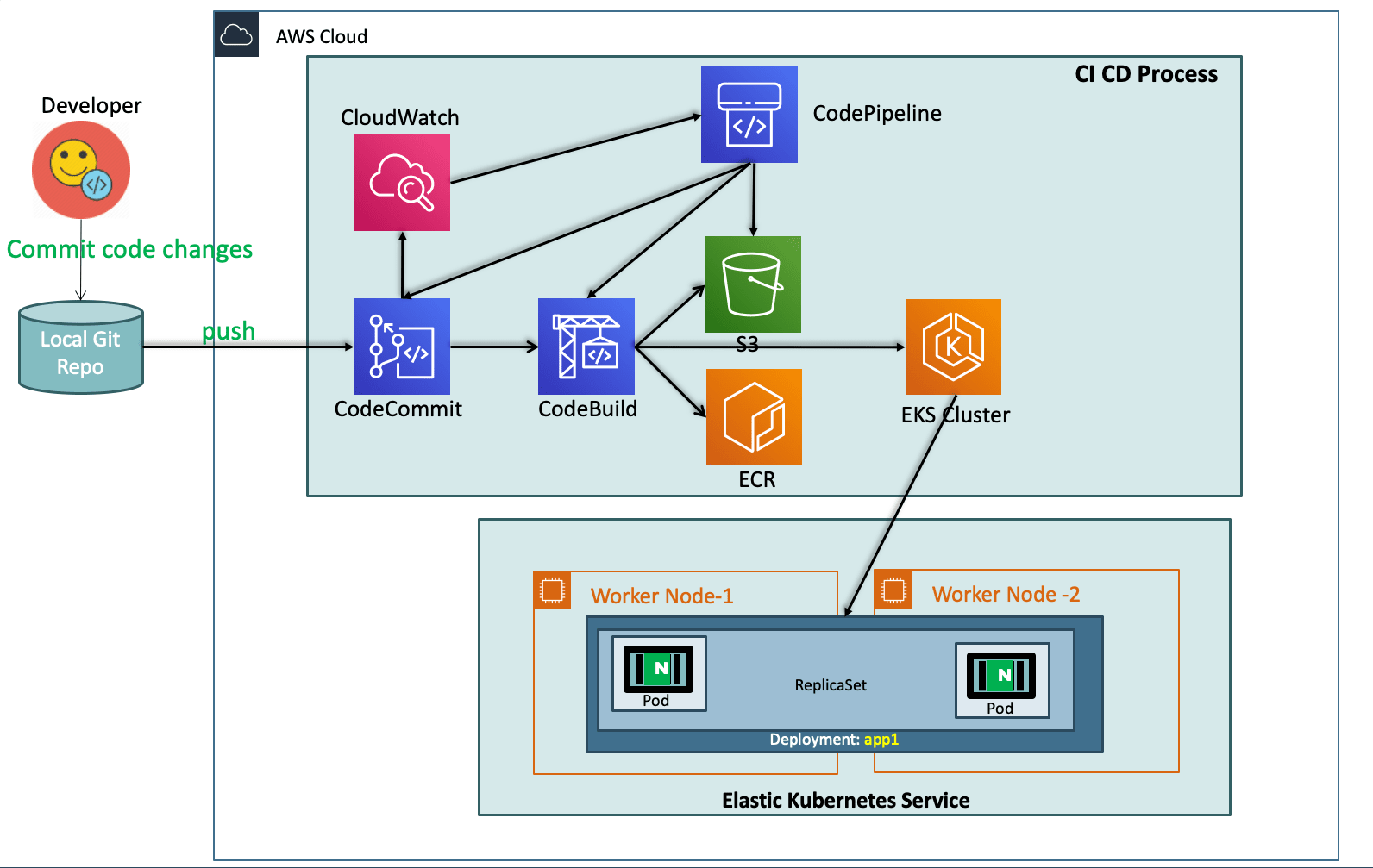
Step-02: What are we going to learn?
- We are going to create a ECR Repository for our Docker Images
- We are going to create Code Commit Git Repository and check-in our Docker and Kubernetes Manifests
- We will write a
buildspec.ymlwhich will eventually build a docker image, push the same to ECR Repository and Deploy the updated k8s Deployment manifest to EKS Cluster. - To achive all this we need also create or update few roles
- STS Assume Role: EksCodeBuildKubectlRole
- Inline Policy: eksdescribe
- CodeBuild Role: codebuild-eks-devops-cb-for-pipe-service-role
- ECR Full Access Policy: AmazonEC2ContainerRegistryFullAccess
- STS Assume Policy: eks-codebuild-sts-assume-role
- STS Assume Role: EksCodeBuildKubectlRole
Step-03: Pre-requisite check
- We are going to deploy a application which will also have a ALB Ingress Service and also will register its DNS name in Route53 using External DNS
- Which means we should have both related pods running in our cluster.
Best Selling AWS EKS Kubernetes Course on Udemy
- Absolute practical scenarios required for real-time implementations
- 18 AWS Services covered in combination with AWS EKS
- 31 Kubernetes Concepts covered in combination with AWS EKS & AWS Services
- Step by Step Documentation on Github and Website
- 18 Docker Images available on Docker Hub for implementing practical scenarios
Step-04: Create ECR Repository for our Application Docker Images
- Go to Services -> Elastic Container Registry -> Create Repository
- Name: eks-devops-nginx
- Tag Immutability: Enable
- Scan On Push: Enable
- Click on Create Repository
- Make a note of Repository name
Step-05: Create CodeCommit Repository
- Code Commit Introduction
- Create Code Commit Repository with name as eks-devops-nginx
- Create git credentials from IAM Service and make a note of those credentials.
- Clone the git repository from Code Commit to local repository, during the process provide your git credentials generated to login to git repo
- Copy all files from course section 11-DevOps-with-AWS-Developer-Tools/Application-Manifests to local repository
- buildspec.yml
- Dockerfile
- app1
- index.html
- kube-manifests
- 01-DEVOPS-Nginx-Deployment.yml
- 02-DEVOPS-Nginx-NodePortService.yml
- 03-DEVOPS-Nginx-ALB-IngressService.yml
- Commit code and Push to CodeCommit Repo
- Verify the same on CodeCommit Repository in AWS Management console.
Application Manifests Overview
- Application-Manifests
- buildspec.yml
- Dockerfile
- app1
- index.html
- kube-manifests
- 01-DEVOPS-Nginx-Deployment.yml
- 02-DEVOPS-Nginx-NodePortService.yml
- 03-DEVOPS-Nginx-ALB-IngressService.yml
version: 0.2
phases:
  install:
    commands:
      - echo "Install Phase - Nothing to do using latest Amazon Linux Docker Image for CodeBuild which has all AWS Tools - https://github.com/aws/aws-codebuild-docker-images/blob/master/al2/x86_64/standard/3.0/Dockerfile"
  pre_build:
      commands:
        # Docker Image Tag with Date Time & Code Buiild Resolved Source Version
        - TAG="$(date +%Y-%m-%d.%H.%M.%S).$(echo $CODEBUILD_RESOLVED_SOURCE_VERSION | head -c 8)"
        # Update Image tag in our Kubernetes Deployment Manifest
        - echo "Update Image tag in kube-manifest..."
        - sed -i 's@CONTAINER_IMAGE@'"$REPOSITORY_URI:$TAG"'@' kube-manifests/01-DEVOPS-Nginx-Deployment.yml
        # Verify AWS CLI Version
        - echo "Verify AWS CLI Version..."
        - aws --version
        # Login to ECR Registry for docker to push the image to ECR Repository
        - echo "Login in to Amazon ECR..."
        - $(aws ecr get-login --no-include-email)
        # Update Kube config Home Directory
        - export KUBECONFIG=$HOME/.kube/config
  build:
    commands:
      # Build Docker Image
      - echo "Build started on `date`"
      - echo "Building the Docker image..."
      - docker build --tag $REPOSITORY_URI:$TAG .
  post_build:
    commands:
      # Push Docker Image to ECR Repository
      - echo "Build completed on `date`"
      - echo "Pushing the Docker image to ECR Repository"
      - docker push $REPOSITORY_URI:$TAG
      - echo "Docker Image Push to ECR Completed -  $REPOSITORY_URI:$TAG"
      # Extracting AWS Credential Information using STS Assume Role for kubectl
      - echo "Setting Environment Variables related to AWS CLI for Kube Config Setup"
      - CREDENTIALS=$(aws sts assume-role --role-arn $EKS_KUBECTL_ROLE_ARN --role-session-name codebuild-kubectl --duration-seconds 900)
      - export AWS_ACCESS_KEY_ID="$(echo ${CREDENTIALS} | jq -r '.Credentials.AccessKeyId')"
      - export AWS_SECRET_ACCESS_KEY="$(echo ${CREDENTIALS} | jq -r '.Credentials.SecretAccessKey')"
      - export AWS_SESSION_TOKEN="$(echo ${CREDENTIALS} | jq -r '.Credentials.SessionToken')"
      - export AWS_EXPIRATION=$(echo ${CREDENTIALS} | jq -r '.Credentials.Expiration')
      # Setup kubectl with our EKS Cluster
      - echo "Update Kube Config"
      - aws eks update-kubeconfig --name $EKS_CLUSTER_NAME
      # Apply changes to our Application using kubectl
      - echo "Apply changes to kube manifests"
      - kubectl apply -f kube-manifests/
      - echo "Completed applying changes to Kubernetes Objects"
      # Create Artifacts which we can use if we want to continue our pipeline for other stages
      - printf '[{"name":"01-DEVOPS-Nginx-Deployment.yml","imageUri":"%s"}]' $REPOSITORY_URI:$TAG > build.json
      # Additional Commands to view your credentials
      #- echo "Credentials Value is..  ${CREDENTIALS}"
      #- echo "AWS_ACCESS_KEY_ID...  ${AWS_ACCESS_KEY_ID}"
      #- echo "AWS_SECRET_ACCESS_KEY...  ${AWS_SECRET_ACCESS_KEY}"
      #- echo "AWS_SESSION_TOKEN...  ${AWS_SESSION_TOKEN}"
      #- echo "AWS_EXPIRATION...  $AWS_EXPIRATION"
      #- echo "EKS_CLUSTER_NAME...  $EKS_CLUSTER_NAME"
artifacts:
  files:
    - build.json
    - kube-manifests/*
Kubernetes Manifests
#01-DEVOPS-Nginx-Deployment.yml
apiVersion: apps/v1
kind: Deployment
metadata:
  name: eks-devops-deployment
  labels:
    app: eks-devops
spec:
  replicas: 2
  selector:
    matchLabels:
      app: eks-devops
  template:
    metadata:
      labels:
        app: eks-devops
    spec:
      containers:
        - name: eks-devops
          image: CONTAINER_IMAGE
          ports:
            - containerPort: 80
#02-DEVOPS-Nginx-NodePortService.yml
apiVersion: v1
kind: Service
metadata:
  name: eks-devops-nodeport-service
  labels:
    app: eks-devops
  annotations:
#Important Note:  Need to add health check path annotations in service level if we are planning to use multiple targets in a load balancer
    alb.ingress.kubernetes.io/healthcheck-path: /app1/index.html
spec:
  type: NodePort
  selector:
    app: eks-devops
  ports:
    - port: 80
      targetPort: 80
#03-DEVOPS-Nginx-ALB-IngressService.yml
# Annotations Reference:  https://kubernetes-sigs.github.io/aws-alb-ingress-controller/guide/ingress/annotation/
apiVersion: extensions/v1beta1
kind: Ingress
metadata:
  name: eks-devops-ingress-service
  labels:
    app: eks-devops
  annotations:
    # Ingress Core Settings
    kubernetes.io/ingress.class: "alb"
    alb.ingress.kubernetes.io/scheme: internet-facing
    # Health Check Settings
    alb.ingress.kubernetes.io/healthcheck-protocol: HTTP
    alb.ingress.kubernetes.io/healthcheck-port: traffic-port
    alb.ingress.kubernetes.io/healthcheck-interval-seconds: '15'
    alb.ingress.kubernetes.io/healthcheck-timeout-seconds: '5'
    alb.ingress.kubernetes.io/success-codes: '200'
    alb.ingress.kubernetes.io/healthy-threshold-count: '2'
    alb.ingress.kubernetes.io/unhealthy-threshold-count: '2'
    ## SSL Settings
    alb.ingress.kubernetes.io/listen-ports: '[{"HTTPS":443}, {"HTTP":80}]'
    alb.ingress.kubernetes.io/certificate-arn: arn:aws:acm:us-east-1:180789647333:certificate/9f042b5d-86fd-4fad-96d0-c81c5abc71e1
    #alb.ingress.kubernetes.io/ssl-policy: ELBSecurityPolicy-TLS-1-1-2017-01 #Optional (Picks default if not used)
    # SSL Redirect Setting
    alb.ingress.kubernetes.io/actions.ssl-redirect: '{"Type": "redirect", "RedirectConfig": { "Protocol": "HTTPS", "Port": "443", "StatusCode": "HTTP_301"}}'
    # External DNS - For creating a Record Set in Route53
    external-dns.alpha.kubernetes.io/hostname: devops.kubeoncloud.com
spec:
  rules:
    - http:
        paths:
          - path: /* # SSL Redirect Setting
            backend:
              serviceName: ssl-redirect
              servicePort: use-annotation
          - path: /*
            backend:
              serviceName: eks-devops-nodeport-service
              servicePort: 80
# Important Note-1: In path based routing order is very important, if we are going to use  "/*", try to use it at the end of all rules.
Step-06: Create STS Assume IAM Role for CodeBuild to interact with AWS EKS
- In an AWS CodePipeline, we are going to use AWS CodeBuild to deploy changes to our Kubernetes manifests.
- This requires an AWS IAM role capable of interacting with the EKS cluster.
- In this step, we are going to create an IAM role and add an inline policy
EKS:Describethat we will use in the CodeBuild stage to interact with the EKS cluster via kubectl.# Export your Account ID export ACCOUNT_ID=180789647333 # Set Trust Policy TRUST="{ \"Version\": \"2012-10-17\", \"Statement\": [ { \"Effect\": \"Allow\", \"Principal\": { \"AWS\": \"arn:aws:iam::${ACCOUNT_ID}:root\" }, \"Action\": \"sts:AssumeRole\" } ] }" # Verify inside Trust policy, your account id got replacd echo $TRUST # Create IAM Role for CodeBuild to Interact with EKS aws iam create-role --role-name EksCodeBuildKubectlRole --assume-role-policy-document "$TRUST" --output text --query 'Role.Arn' # Define Inline Policy with eks Describe permission in a file iam-eks-describe-policy echo '{ "Version": "2012-10-17", "Statement": [ { "Effect": "Allow", "Action": "eks:Describe*", "Resource": "*" } ] }' > /tmp/iam-eks-describe-policy # Associate Inline Policy to our newly created IAM Role aws iam put-role-policy --role-name EksCodeBuildKubectlRole --policy-name eks-describe --policy-document file:///tmp/iam-eks-describe-policy # Verify the same on Management Console
Step-07: Update EKS Cluster aws-auth ConfigMap with new role created in previous step
- We are going to add the role to the
aws-auth ConfigMapfor the EKS cluster. - Once the
EKS aws-auth ConfigMapincludes this new role, kubectl in the CodeBuild stage of the pipeline will be able to interact with the EKS cluster via the IAM role.# Verify what is present in aws-auth configmap before change kubectl get configmap aws-auth -o yaml -n kube-system # Export your Account ID export ACCOUNT_ID=180789647333 # Set ROLE value ROLE=" - rolearn: arn:aws:iam::$ACCOUNT_ID:role/EksCodeBuildKubectlRole\n username: build\n groups:\n - system:masters" # Get current aws-auth configMap data and attach new role info to it kubectl get -n kube-system configmap/aws-auth -o yaml | awk "/mapRoles: \|/{print;print \"$ROLE\";next}1" > /tmp/aws-auth-patch.yml # Patch the aws-auth configmap with new role kubectl patch configmap/aws-auth -n kube-system --patch "$(cat /tmp/aws-auth-patch.yml)" # Verify what is updated in aws-auth configmap after change kubectl get configmap aws-auth -o yaml -n kube-system
How ALB Ingress Controller Works?
Subscribe to our Youtube Channel
Step-08: Review the buildspec.yml for CodeBuild & Environment Variables
Code Build Introduction
- Get a high level overview about CodeBuild Service
Environment Variables for CodeBuild
REPOSITORY_URI = 180789647333.dkr.ecr.us-east-1.amazonaws.com/eks-devops-nginx
EKS_KUBECTL_ROLE_ARN = arn:aws:iam::180789647333:role/EksCodeBuildKubectlRole
EKS_CLUSTER_NAME = eksdemo1
Review buildspec.yml
version: 0.2
phases:
  install:
    commands:
      - echo "Install Phase - Nothing to do using latest Amazon Linux Docker Image for CodeBuild which has all AWS Tools - https://github.com/aws/aws-codebuild-docker-images/blob/master/al2/x86_64/standard/3.0/Dockerfile"
  pre_build:
      commands:
        # Docker Image Tag with Date Time & Code Buiild Resolved Source Version
        - TAG="$(date +%Y-%m-%d.%H.%M.%S).$(echo $CODEBUILD_RESOLVED_SOURCE_VERSION | head -c 8)"
        # Update Image tag in our Kubernetes Deployment Manifest
        - echo "Update Image tag in kube-manifest..."
        - sed -i 's@CONTAINER_IMAGE@'"$REPOSITORY_URI:$TAG"'@' kube-manifests/01-DEVOPS-Nginx-Deployment.yml
        # Verify AWS CLI Version
        - echo "Verify AWS CLI Version..."
        - aws --version
        # Login to ECR Registry for docker to push the image to ECR Repository
        - echo "Login in to Amazon ECR..."
        - $(aws ecr get-login --no-include-email)
        # Update Kube config Home Directory
        - export KUBECONFIG=$HOME/.kube/config
  build:
    commands:
      # Build Docker Image
      - echo "Build started on `date`"
      - echo "Building the Docker image..."
      - docker build --tag $REPOSITORY_URI:$TAG .
  post_build:
    commands:
      # Push Docker Image to ECR Repository
      - echo "Build completed on `date`"
      - echo "Pushing the Docker image to ECR Repository"
      - docker push $REPOSITORY_URI:$TAG
      - echo "Docker Image Push to ECR Completed -  $REPOSITORY_URI:$TAG"
      # Extracting AWS Credential Information using STS Assume Role for kubectl
      - echo "Setting Environment Variables related to AWS CLI for Kube Config Setup"
      - CREDENTIALS=$(aws sts assume-role --role-arn $EKS_KUBECTL_ROLE_ARN --role-session-name codebuild-kubectl --duration-seconds 900)
      - export AWS_ACCESS_KEY_ID="$(echo ${CREDENTIALS} | jq -r '.Credentials.AccessKeyId')"
      - export AWS_SECRET_ACCESS_KEY="$(echo ${CREDENTIALS} | jq -r '.Credentials.SecretAccessKey')"
      - export AWS_SESSION_TOKEN="$(echo ${CREDENTIALS} | jq -r '.Credentials.SessionToken')"
      - export AWS_EXPIRATION=$(echo ${CREDENTIALS} | jq -r '.Credentials.Expiration')
      # Setup kubectl with our EKS Cluster
      - echo "Update Kube Config"
      - aws eks update-kubeconfig --name $EKS_CLUSTER_NAME
      # Apply changes to our Application using kubectl
      - echo "Apply changes to kube manifests"
      - kubectl apply -f kube-manifests/
      - echo "Completed applying changes to Kubernetes Objects"
      # Create Artifacts which we can use if we want to continue our pipeline for other stages
      - printf '[{"name":"01-DEVOPS-Nginx-Deployment.yml","imageUri":"%s"}]' $REPOSITORY_URI:$TAG > build.json
      # Additional Commands to view your credentials
      #- echo "Credentials Value is..  ${CREDENTIALS}"
      #- echo "AWS_ACCESS_KEY_ID...  ${AWS_ACCESS_KEY_ID}"
      #- echo "AWS_SECRET_ACCESS_KEY...  ${AWS_SECRET_ACCESS_KEY}"
      #- echo "AWS_SESSION_TOKEN...  ${AWS_SESSION_TOKEN}"
      #- echo "AWS_EXPIRATION...  $AWS_EXPIRATION"
      #- echo "EKS_CLUSTER_NAME...  $EKS_CLUSTER_NAME"
artifacts:
  files:
    - build.json
    - kube-manifests/*
Step-09: Create CodePipeline
CodePipeline Introduction
- Get a high level overview about CodePipeline Service
Create CodePipeline
- Create CodePipeline
- Go to Services -> CodePipeline -> Create Pipeline
- Pipeline Settings
- Pipeline Name: eks-devops-pipe
- Service Role: New Service Role (leave to defaults)
- Role Name: Auto-populated
- Rest all leave to defaults and click Next
- Source
- Source Provider: AWS CodeCommit
- Repository Name: eks-devops-nginx
- Branch Name: master
- Change Detection Options: CloudWatch Events (leave to defaults)
- Build
- Build Provider: AWS CodeBuild
- Region: US East (N.Virginia)
- Project Name: Click on Create Project
- Create Build Project
- Project Configuration
- Project Name: eks-devops-cb-for-pipe
- Description: CodeBuild Project for EKS DevOps Pipeline
- Environment
- Environment Image: Managed Image
- Operating System: Amazon Linux 2
- Runtimes: Standard
- Image: aws/codebuild/amazonlinux2-x86_64-standard:3.0
- Image Version: Always use the latest version for this runtime
- Environment Type: Linux
- Privileged: Enable
- Role Name: Auto-populated
- Additional Configurations
- All leave to defaults except Environment Variables
- Add Environment Variables
- REPOSITORY_URI = 180789647333.dkr.ecr.us-east-1.amazonaws.com/eks-devops-nginx
- EKS_KUBECTL_ROLE_ARN = arn:aws:iam::180789647333:role/EksCodeBuildKubectlRole
- EKS_CLUSTER_NAME = eksdemo1
- Buildspec
- leave to defaults
- Logs
- Group Name: eks-deveops-cb-pipe
- Stream Name:
- Click on Continue to CodePipeline
- We should see a message
Successfully created eks-devops-cb-for-pipe in CodeBuild. - Click Next
- Deploy
- Click on Skip Deploy Stage
- Review
- Review and click on Create Pipeline
Step-10: Updae CodeBuild Role to have access to ECR full access
- First pipeline run will fail as CodeBuild not able to upload or push newly created Docker Image to ECR Repostory
- Update the CodeBuild Role to have access to ECR to upload images built by codeBuild.
- Role Name: codebuild-eks-devops-cb-for-pipe-service-role
- Policy Name: AmazonEC2ContainerRegistryFullAccess
- Make changes to index.html (Update as V2), locally and push change to CodeCommit
- Verify CodeBuild Logs
- New image should be uploaded to ECR, verify the ECR with new docker image tag date time.
- Build will fail again at Post build stage at STS Assume role section. Lets fix that in next step.
AWS ALB Ingress Installation
AWS ALB Ingress Implementation Basics
Subscribe to our Youtube Channel
Step-11: Update CodeBuild Role to have access to STS Assume Role we have created using STS Assume Role Policy
- Build should be failed due to CodeBuild dont have access to perform updates in EKS Cluster.
- It even cannot assume the STS Assume role whatever we created.
- Create STS Assume Policy and Associate that to CodeBuild Role
codebuild-eks-devops-cb-for-pipe-service-role
Create STS Assume Role Policy
- Go to Services IAM -> Policies -> Create Policy
- In Visual Editor Tab
- Service: STS
- Actions: Under Write - Select
AssumeRole - Resources: Specific
- Add ARN
- Specify ARN for Role: arn:aws:iam::180789647333:role/EksCodeBuildKubectlRole
- Click Add
- Click on Review Policy
- Name: eks-codebuild-sts-assume-role
- Description: CodeBuild to interact with EKS cluster to perform changes
- Click on Create Policy
Associate Policy to CodeBuild Role
- Role Name: codebuild-eks-devops-cb-for-pipe-service-role
- Policy to be associated:
eks-codebuild-sts-assume-role
Step-12: Make changes to index.html file
- Make changes to index.html (Update as V3)
- Commit the changes to local git repository and push to codeCommit Repository
- Monitor the codePipeline
- Test by accessing the static html page
- Verify CodeBuild Logs
- Test by accessing the static html page
Step-13: Add change to Ingress manifest
- Add new DNS entry and push the changes and test
- 03-DEVOPS-Nginx-ALB-IngressService.yml
- Commit the changes to local git repository and push to codeCommit Repository
- Monitor the codePipeline
- Test by accessing the static html page
- Verify CodeBuild Logs
- Test by accessing the static html page
Step-14: Clean-Up
- Delete All kubernetes Objects in EKS Cluster
- Delete Pipeline
- Delete CodeBuild Project
- Delete CodeCommit Repository
- Delete Roles and Policies created
References
- https://docs.aws.amazon.com/codebuild/latest/userguide/build-env-ref-available.html
- https://github.com/aws/aws-codebuild-docker-images/blob/master/al2/x86_64/standard/3.0/Dockerfile
- STS Assume Role: https://docs.aws.amazon.com/cli/latest/reference/sts/assume-role.html
- https://docs.aws.amazon.com/IAM/latest/UserGuide/troubleshoot_roles.html
Free Courses
Start with our Getting Started Free Courses!
🎉 New Course
Ultimate DevOps Real-World Project Implementation on AWS
$15.99
$84.99
81% OFF
JUL2026
Enroll Now on Udemy
🎉 Offer