Azure Kubernetes Service AKS Virtual Nodes (Serverless)
Link to all the Kubernetes Manifests
Step-01: Introduction
- What is Virtual Kubelet?
- What is Azure Container Instances - ACI?
- What are AKS Virtual Nodes?
- Important Note: Virtual nodes require AKS clusters with Azure CNI networking
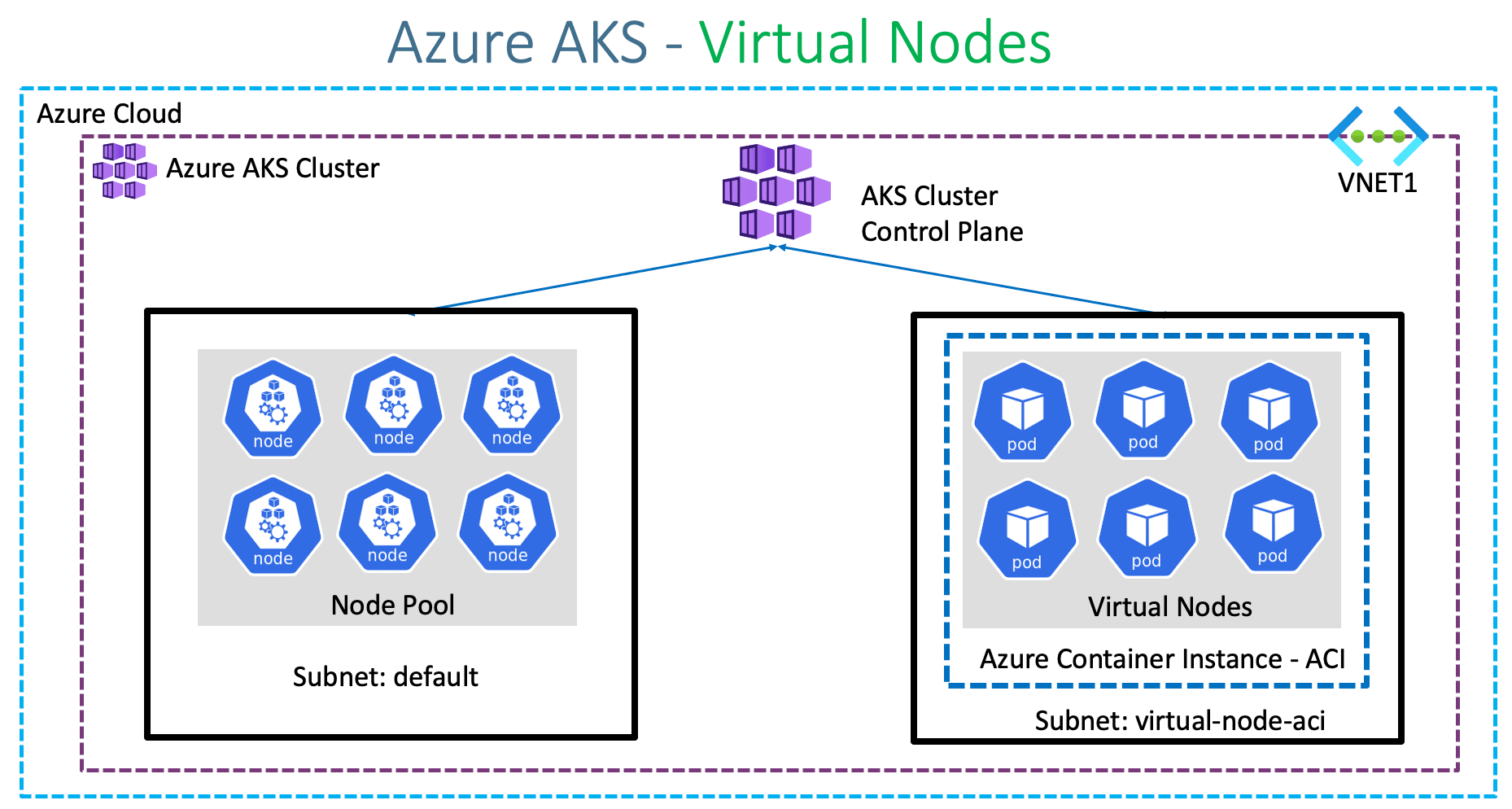
Azure Kubernetes Service with Azure DevOps and Terraform
Step-02: Create a new cluster using Azure Management Console
- Basics
- Subscription: Free Trial or Pay-as-you-go
- Resource Group: Creat New: aks-rg2
- Kubernetes Cluster Name: aksdemo2
- Region: (US) Central US
- Kubernetes Version: Select what ever is latest stable version
- Node Size: Standard DS2 v2 (Default one)
- Node Count: 1
- Node Pools
- Virtual Nodes: Enabled
- leave to defaults
- Authentication
- Authentication method: System-assigned managed identity
- Rest all leave to defaults
- Networking
- Network Configuration: Advanced
- Network Policy: Azure
- Rest all leave to defaults
- Integrations
- Azure Container Registry: None
- leave to defaults
- Tags
- leave to defaults
- Review + Create
- Click on Create
Step-03: Verify Nodes & ACI
# Configure Command Line Credentials
az aks get-credentials --name aksdemo2 --resource-group aks-rg2

# Verify Nodes
kubectl get nodes
kubectl get nodes -o wide

# Verify aci-connector-linux
kubectl get pods -n kube-system

# Verify logs of ACI Connector Linux
kubectl logs -f $(kubectl get po -n kube-system | egrep -o 'aci-connector-linux-[A-Za-z0-9-]+') -n kube-system
virtual-node-aci-linux node also listed for kubectl get nodes output
- Sample Output
Kalyans-MacBook-Pro:azure-aks-kubernetes-masterclass kdaida$ kubectl get nodes
NAME                                STATUS   ROLES   AGE   VERSION
aks-agentpool-87689508-vmss000000   Ready    agent   24m   v1.17.11
virtual-node-aci-linux              Ready    agent   21m   v1.14.3-vk-azure-aci-v1.2.1.1
Kalyans-MacBook-Pro:azure-aks-kubernetes-masterclass kdaida$
Step-04: Update Deployment Manifest to Schedule Pod on Virtual Nodes
- The below section should be added in Deployment for Azure AKS to schedule the pod on Azure Virtual Nodes
- Review the manifests
Step-05: Deploy Application Manifests
# Deploy
kubectl apply -f kube-manifests/

# Verify pods
kubectl get pods -o wide

# Get Public IP
kubectl get svc

# Access Application
http://<Public-ip-captured-from-get-service>
Step-06: Scale the Deployment
# List Deployments
kubectl get deploy

# Scale the Deployment to 10 Replicas
kubectl scale --replicas=10 deployment app1-nginx-deployment

# List Pods
kubectl get pods
Step-07: Clean-Up
# Delete Application
kubectl delete -f kube-manifests/

# Delete this new cluster created for Virtual Nodes (if you want to)
az aks delete --name aksdemo2 --resource-group aks-rg2
References
- Azure Virtual Nodes - Limitations
- Virtual kubelet - Referece - 1
- Virtual kubelet - Referece - 2
- Virtual Node Autoscale - Optional & legacy
Best Selling Azure Kubernetes Service Course on Udemy
Best Selling AWS EKS Kubernetes Course on Udemy
HashiCorp Certified Terraform Associate - 50 Practical Demos
🎉 New Course
Ultimate DevOps Real-World Project Implementation on AWS
$15.99
$84.99
81% OFF
DEVOPS2026FEB
Enroll Now on Udemy
🎉 Offer