Azure AKS - Horizontal Pod Autoscaling (HPA)
Link to all the Kubernetes Manifests
Step-01: Introduction
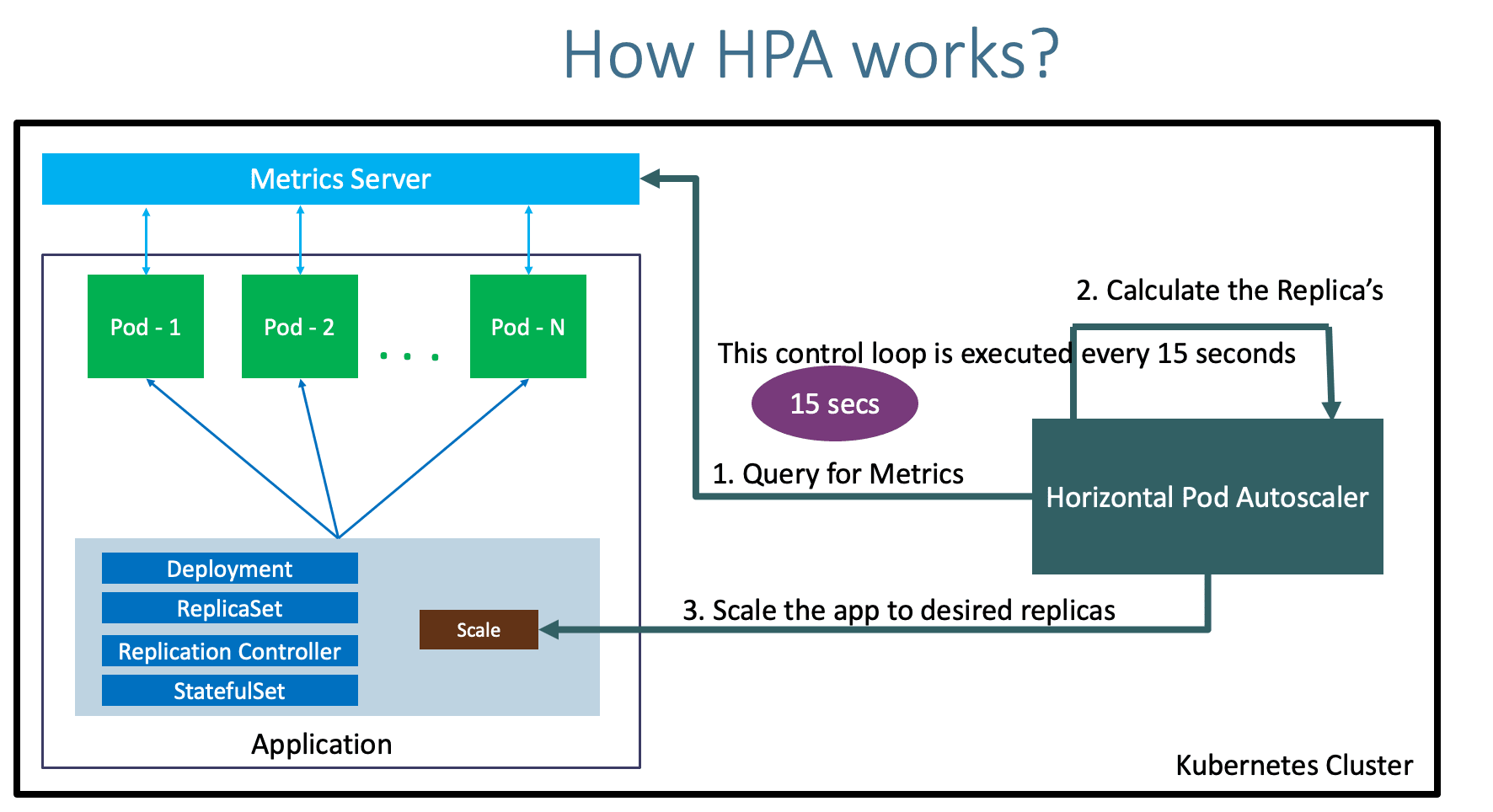
- What is Horizontal Pod Autoscaling?
- How HPA Works?
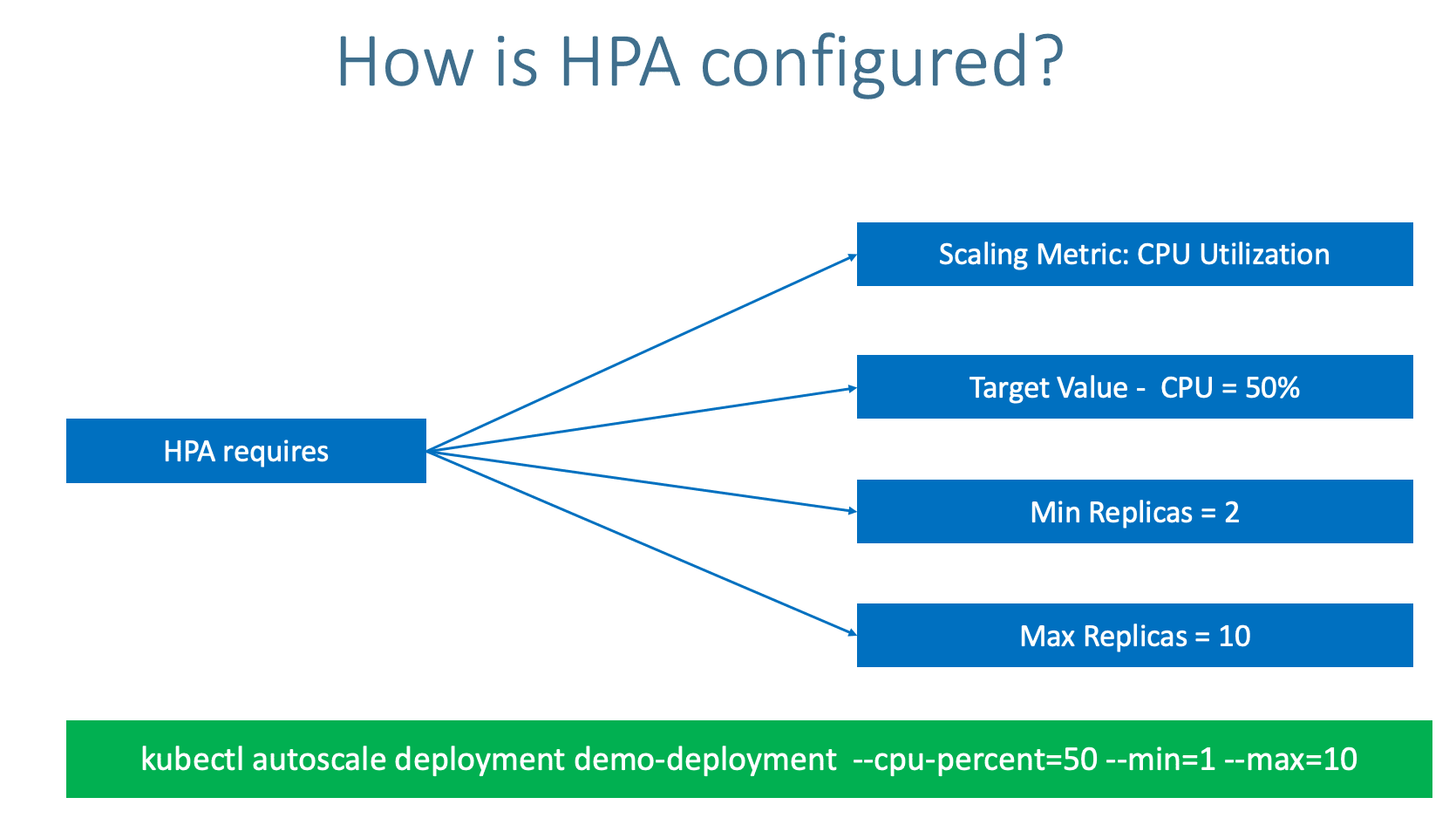
- How HPA configured?
- Metrics Server
Azure Kubernetes Service with Azure DevOps and Terraform
Step-02: Review Deploy our Application
# Deploy
kubectl apply -f kube-manifests/apps

# List Pods, Deploy & Service
kubectl get pod
kubect get svc

# Access Application (Only if our Cluster is Public Subnet)
http://<PublicIP-from-Get-SVC-Output>
Step-03: Create a Horizontal Pod Autoscaler resource for the "hpa-demo-deployment"
- This command creates an autoscaler that targets 20 percent CPU utilization for the deployment, with a minimum of one pod and a maximum of ten pods.
- When the average CPU load is below 20 percent, the autoscaler tries to reduce the number of pods in the deployment, to a minimum of one.
- When the load is greater than 20 percent, the autoscaler tries to increase the number of pods in the deployment, up to a maximum of ten
# HPA Imperative - Template
kubectl autoscale deployment <deployment-name> --cpu-percent=20 --min=1 --max=10

# HPA Imperative - Replace
kubectl autoscale deployment hpa-demo-deployment --cpu-percent=20 --min=1 --max=10

# HPA Declarative (Optional - If you use above imperative command this is just for reference)
kubectl apply -f kube-manifests/hpa-manifest/hpa-manifest.yml

# Describe HPA
kubectl describe hpa/hpa-demo-deployment

# List HPA
kubectl get horizontalpodautoscaler.autoscaling/hpa-demo-deployment
Step-04: Create the load & Verify how HPA is working
# Generate Load (new Terminal)
kubectl run apache-bench -i --tty --rm --image=httpd -- ab -n 500000 -c 1000 http://hpa-demo-service-nginx.default.svc.cluster.local/

# List all HPA
kubectl get hpa

# List specific HPA
kubectl get hpa hpa-demo-deployment

# Describe HPA
kubectl describe hpa/hpa-demo-deployment

# List Pods
kubectl get pods
Step-05: Cooldown / Scaledown
- Default cooldown period is 5 minutes.
- Once CPU utilization of pods is less than 20%, it will starting terminating pods and will reach to minimum 1 pod as configured.
Step-06: Clean-Up
# Delete HPA
kubectl delete hpa hpa-demo-deployment

# Delete Deployment & Service
kubectl delete -f kube-manifests/apps
Step-07: Deploy App and HPA Declarative Manifest
# Deploy App
kubectl apply -f kube-manifests/apps

# Deploy HPA Manifest
kubectl apply -f kube-manifests/hpa-manifest
Step-08: Create the load & Verify how HPA is working
# Generate Load
kubectl run apache-bench -i --tty --rm --image=httpd -- ab -n 500000 -c 1000 http://hpa-demo-service-nginx.default.svc.cluster.local/

# List all HPA
kubectl get hpa

# List specific HPA
kubectl get hpa hpa-demo-declarative

# Describe HPA
kubectl describe hpa/hpa-demo-declarative

# List Pods
kubectl get pods
Step-09: Clean-Up
# Delete HPA & Apps
kubectl delete -R -f kube-manifests/

# Delete Cluster, Resource Group  (Optional)
echo $RESOURCE_GROUP
az group delete -n ${RESOURCE_GROUP}
Referencess
Best Selling Azure Kubernetes Service Course on Udemy
Best Selling AWS EKS Kubernetes Course on Udemy
HashiCorp Certified Terraform Associate - 50 Practical Demos

🎉 New Course
Ultimate DevOps Real-World Project Implementation on AWS
$15.99
$84.99
81% OFF
DEVOPS2026FEB
Enroll Now on Udemy
🎉 Offer