Kubernetes Namespaces - ResourceQuota - Declarative using YAML
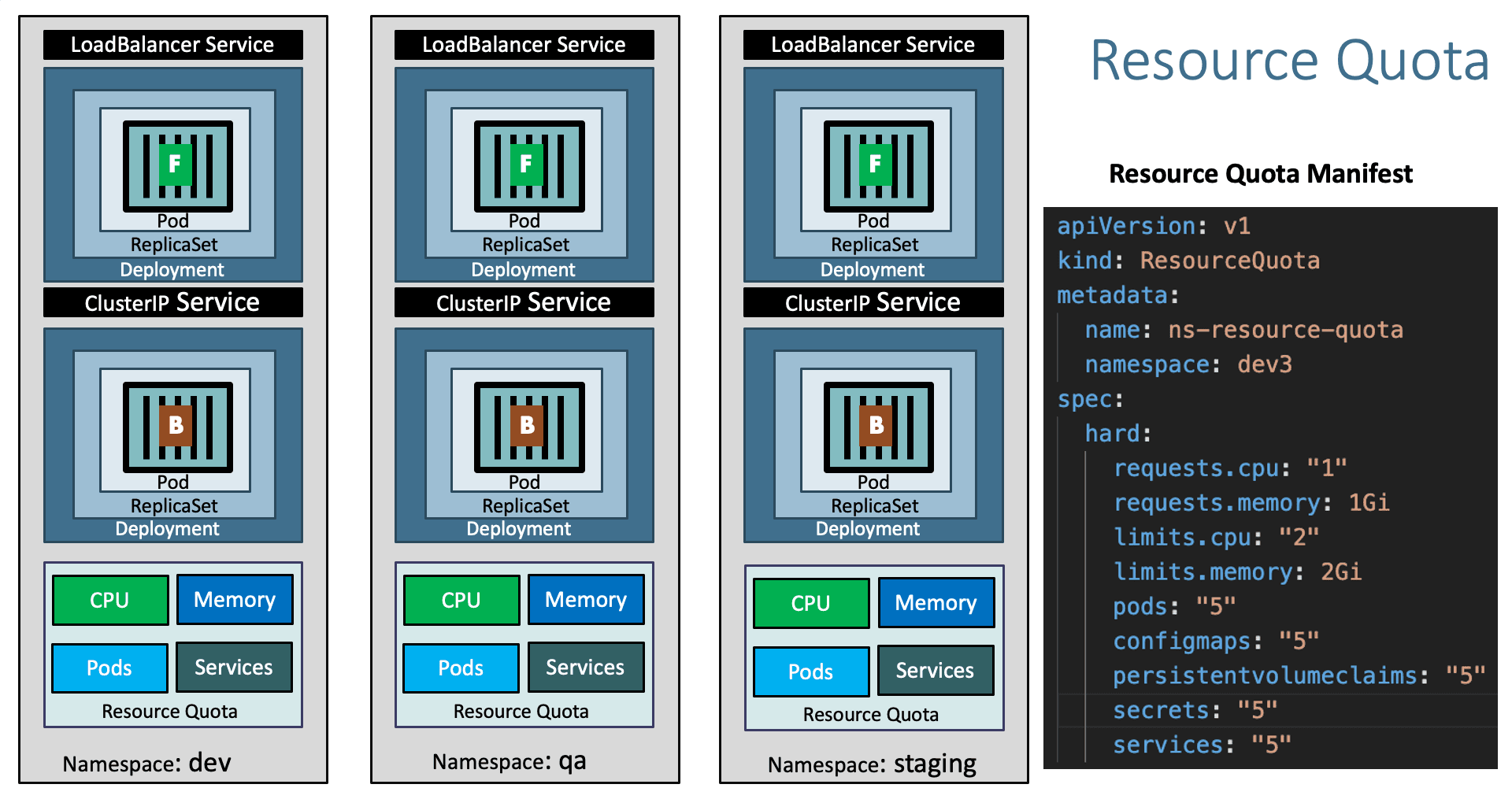
Step-01: Create Namespace manifest
- Important Note: File name starts with
00-so that when creating k8s objects namespace will get created first so it don't throw an error.
Azure Kubernetes Service with Azure DevOps and Terraform
Step-02: Create ResourceQuota manifest
apiVersion: v1
kind: ResourceQuota
metadata:
  name: ns-resource-quota
  namespace: dev3
spec:
  hard:
    requests.cpu: "1"
    requests.memory: 1Gi
    limits.cpu: "2"
    limits.memory: 2Gi
    pods: "5"
    configmaps: "5"
    persistentvolumeclaims: "5"
    secrets: "5"
    services: "5"
Step-03: Create k8s objects & Test
# Create All Objects
kubectl apply -f kube-manifests/

# List Pods
kubectl get pods -n dev3

# View Pod Specification (CPU & Memory)
kubectl get pod <pod-name> -o yaml -n dev3

# Get & Describe Limits
kubectl get limits -n dev3
kubectl describe limits default-cpu-mem-limit-range -n dev3

# Get Resource Quota
kubectl get quota -n dev3
kubectl describe quota ns-resource-quota -n dev3

# List Service
kubectl get svc -n dev3

# Access Application
http://<Public-IP-from-List-Services-Output>/app1/index.html
Step-04: Clean-Up
- Delete all k8s objects created as part of this section
References:
- https://kubernetes.io/docs/tasks/administer-cluster/namespaces-walkthrough/
- https://kubernetes.io/docs/tasks/administer-cluster/manage-resources/quota-memory-cpu-namespace/
Additional References:
- https://kubernetes.io/docs/tasks/administer-cluster/manage-resources/cpu-constraint-namespace/
- https://kubernetes.io/docs/tasks/administer-cluster/manage-resources/memory-constraint-namespace/
Best Selling Azure Kubernetes Service Course on Udemy
Best Selling AWS EKS Kubernetes Course on Udemy
HashiCorp Certified Terraform Associate - 50 Practical Demos
🎉 New Course
Ultimate DevOps Real-World Project Implementation on AWS
$15.99
$84.99
81% OFF
DEVOPS2026FEB
Enroll Now on Udemy
🎉 Offer