Ingress - Basics
Link to all the Kubernetes Manifests
Step-01: Introduction
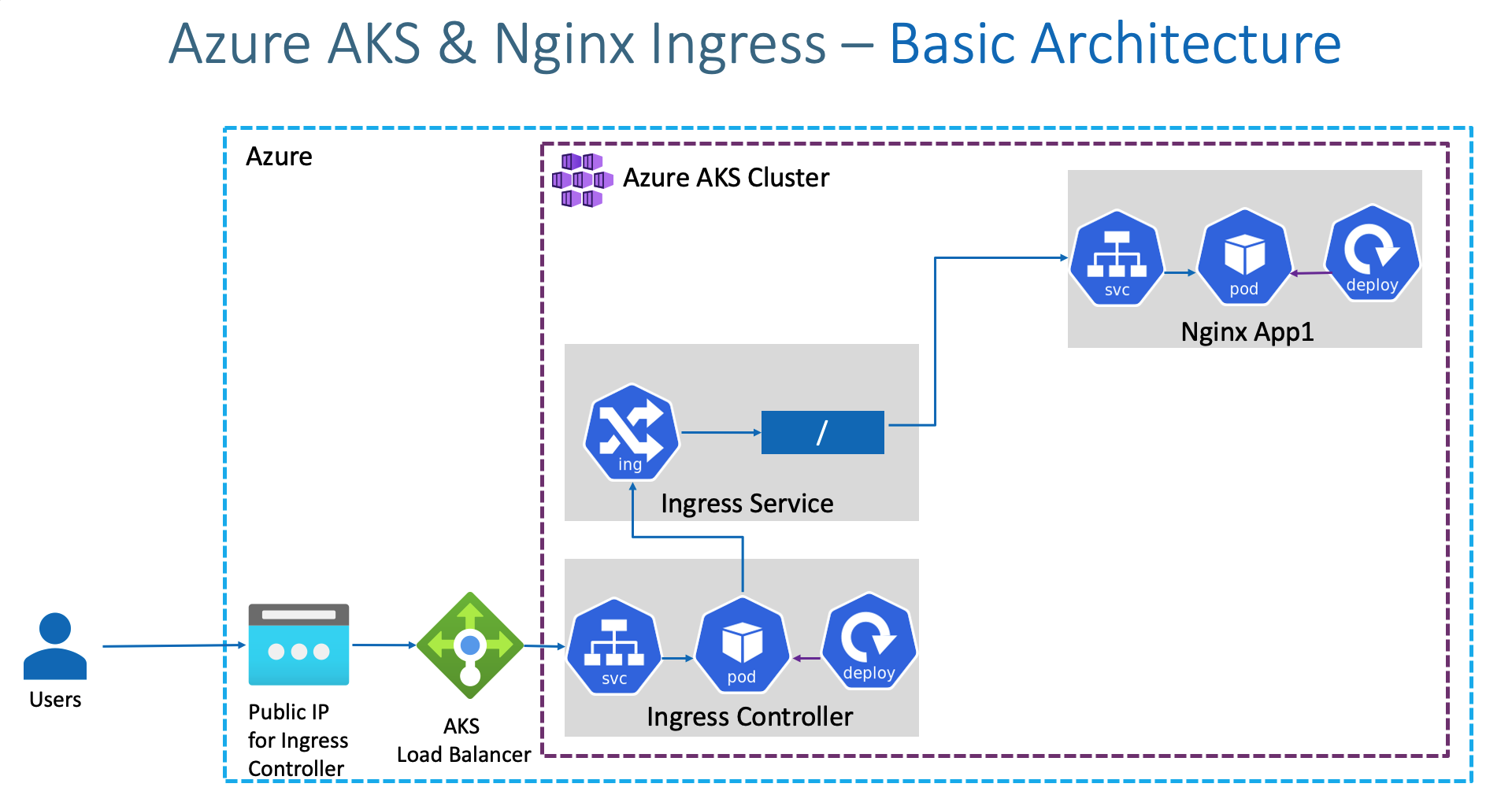
Ingress Basic Architecture
Azure Kubernetes Service with Azure DevOps and Terraform
What are we going to learn?
- We are going to create a Static Public IP for Ingress in Azure AKS
- Associate that Public IP to Ingress Controller during installation.
- We are going to create a namespace
ingress-basicfor Ingress Controller where all ingress controller related things will be placed. - In future, we install cert-manager for SSL certificates also in same namespace.
- Caution Note: This namespace is for Ingress controller stuff, ingress resource we can create in any other namespaces and not an issue. Only condition is create ingress resource and ingress pointed application in same namespace (Example: App1 and Ingress resource of App1 should be in same namespace)
- Create / Review Ingress Manifest
- Deploy a simple Nginx App1 with Ingress manifest and test it
- Clean-Up or delete application after testing
Step-02: Create Static Public IP
# Get the resource group name of the AKS cluster
az aks show --resource-group aks-rg1 --name aksdemo1 --query nodeResourceGroup -o tsv

# TEMPLATE - Create a public IP address with the static allocation
az network public-ip create --resource-group <REPLACE-OUTPUT-RG-FROM-PREVIOUS-COMMAND> --name myAKSPublicIPForIngress --sku Standard --allocation-method static --query publicIp.ipAddress -o tsv

# REPLACE - Create Public IP: Replace Resource Group value
az network public-ip create --resource-group MC_aks-rg1_aksdemo1_centralus --name myAKSPublicIPForIngress --sku Standard --allocation-method static --query publicIp.ipAddress -o tsv
Step-03: Install Ingress Controller
# Install Helm3 (if not installed)
brew install helm

# Create a namespace for your ingress resources
kubectl create namespace ingress-basic

# Add the official stable repository
helm repo add ingress-nginx https://kubernetes.github.io/ingress-nginx
helm repo add stable https://kubernetes-charts.storage.googleapis.com/
helm repo update

#  Customizing the Chart Before Installing.
helm show values ingress-nginx/ingress-nginx

# Use Helm to deploy an NGINX ingress controller
helm install ingress-nginx ingress-nginx/ingress-nginx \
    --namespace ingress-basic \
    --set controller.replicaCount=2 \
    --set controller.nodeSelector."beta\.kubernetes\.io/os"=linux \
    --set defaultBackend.nodeSelector."beta\.kubernetes\.io/os"=linux \
    --set controller.service.externalTrafficPolicy=Local \
    --set controller.service.loadBalancerIP="REPLACE_STATIC_IP"

# Replace Static IP captured in Step-02
helm install ingress-nginx ingress-nginx/ingress-nginx \
    --namespace ingress-basic \
    --set controller.replicaCount=2 \
    --set controller.nodeSelector."beta\.kubernetes\.io/os"=linux \
    --set defaultBackend.nodeSelector."beta\.kubernetes\.io/os"=linux \
    --set controller.service.externalTrafficPolicy=Local \
    --set controller.service.loadBalancerIP="52.154.156.139"


# List Services with labels
kubectl get service -l app.kubernetes.io/name=ingress-nginx --namespace ingress-basic

# List Pods
kubectl get pods -n ingress-basic
kubectl get all -n ingress-basic


# Access Public IP
http://<Public-IP-created-for-Ingress>

# Output should be
404 Not Found from Nginx

# Verify Load Balancer on Azure Mgmt Console
Primarily refer Settings -> Frontend IP Configuration
Step-04: Review Application k8s manifests
- 01-NginxApp1-Deployment.yml
- 02-NginxApp1-ClusterIP-Service.yml
- 03-Ingress-Basic.yml
Step-05: Deploy Application k8s manifests and verify
# Deploy
kubectl apply -f kube-manifests/

# List Pods
kubectl get pods

# List Services
kubectl get svc

# List Ingress
kubectl get ingress

# Access Application
http://<Public-IP-created-for-Ingress>/app1/index.html
http://<Public-IP-created-for-Ingress>

# Verify Ingress Controller Logs
kubectl get pods -n ingress-basic
kubectl logs -f <pod-name> -n ingress-basic
Step-06: Clean-Up Apps
Ingress Annotation Reference
- https://kubernetes.github.io/ingress-nginx/user-guide/nginx-configuration/annotations/
Other References
- https://github.com/kubernetes/ingress-nginx
- https://github.com/kubernetes/ingress-nginx/blob/master/charts/ingress-nginx/values.yaml
- https://raw.githubusercontent.com/kubernetes/ingress-nginx/controller-v0.34.1/deploy/static/provider/cloud/deploy.yaml
- https://kubernetes.github.io/ingress-nginx/deploy/#azure
- https://helm.sh/docs/intro/install/
- https://kubernetes.io/docs/reference/generated/kubernetes-api/v1.19/#ingress-v1-networking-k8s-io
Important Note
Ingress Admission Webhooks
With nginx-ingress-controller version 0.25+, the nginx ingress controller pod exposes an endpoint that will integrate with the validatingwebhookconfiguration Kubernetes feature to prevent bad ingress from being added to the cluster. This feature is enabled by default since 0.31.0.
Best Selling Azure Kubernetes Service Course on Udemy
Best Selling AWS EKS Kubernetes Course on Udemy
HashiCorp Certified Terraform Associate - 50 Practical Demos

🎉 New Course
Ultimate DevOps Real-World Project Implementation on AWS
$15.99
$84.99
81% OFF
DEVOPS2026FEB
Enroll Now on Udemy
🎉 Offer