Azure DevOps - Build and Push Docker Image to Azure Container Registry
Link to all the Manifests
Step-01: Introduction
- Understand Azure DevOps Basics
- Understand Azure Pipelines
- Implement a pipeline to Build and Push Docker Image to Azure Container Registry
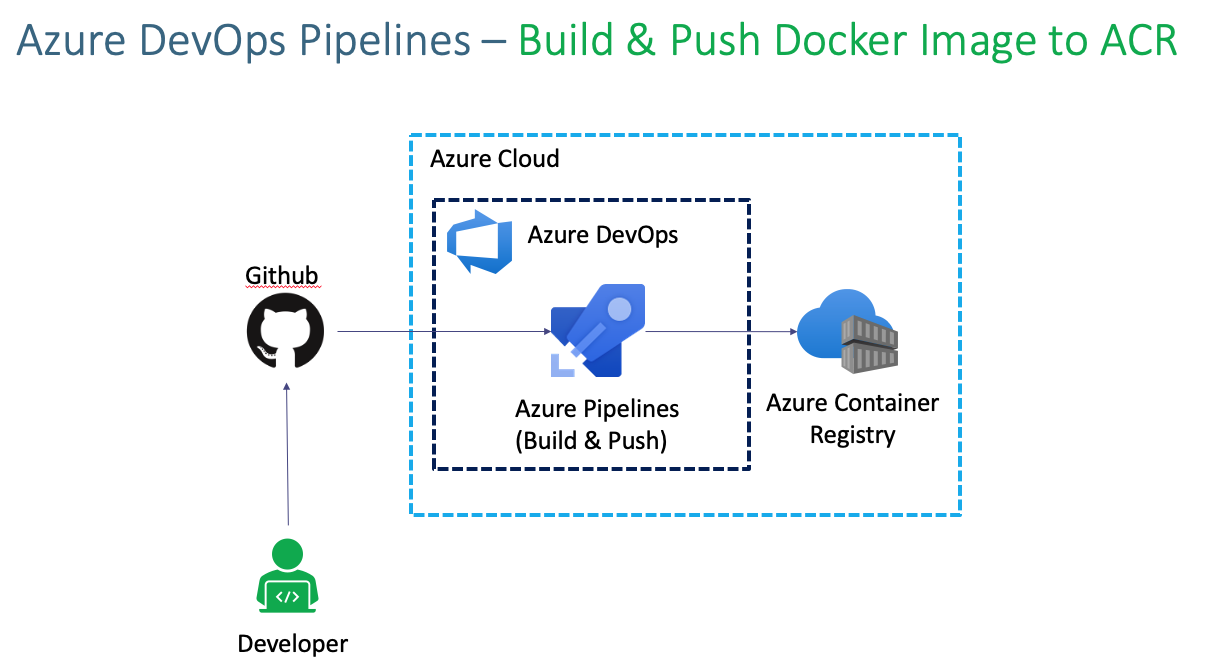
Azure Kubernetes Service with Azure DevOps and Terraform
Step-02: Create Github Project and Check-In Code
Create Github Repo in Github
- Name: azure-devops-github-acr-aks-app1
- Description: Azure DevOps App1 Demo with AKS, Github and Azure Containter Registry
- Repo Type: Public / Private (Your choice)
- Click on Create Repository
Create Local Git Repo and Check-In Code
- Create Local folders
- Copy all files from
Giti-Repository-filesfolder to our new repo folderazure-devops-github-acr-aks-app1# Initialize Git Repo cd azure-devops-github-acr-aks-app1 git init # Do local Commit echo "# Azure DevOps App1 Demo with AKS, Github and ACR" >> README.md git add . git commit -am "V1 Base Commit" # Link Github Remote Repository git remote add origin https://github.com/stacksimplify/azure-devops-github-acr-aks-app1.git # Push to Remote Repository git push --set-upstream origin master # Go to Github Repo - Refresh and check files appeared in githbu repo https://github.com/stacksimplify/azure-devops-github-acr-aks-app1
Step-03: Review github checked-in files
- kube-manifests
- Dockerfile
- index.html
Step-04: Create Azure Container Registry ACR
- Go to Services -> Container Registries
- Click on Add
- Subscription: StackSimplify-Paid-Subsciption
- Resource Group: acr-rg1
- Registry Name: aksdevopsacr (NAME should be unique across Azure Cloud)
- Location: Central US
- SKU: Basic (Pricing Note: $0.167 per day)
- Click on Review + Create
- Click on Create
Step-05: Creat DevOps Organization
- Go to
- https://dev.azure.com/
- Sign in to Azure DevOps
- Our Organization will be automatically created and if you want to manually create organization you can create one.
- Organization Name: aksdemo1
Step-06 : Create DevOps Project
- Project Name: azure-devops-github-acr-aks-app1
- Project Description: AKS CICD Pipelines with Github and Azure Container Registry ACR
- Visibility: Private
- Advanced: Leave to defaults
- Version Control: Git
- Work Item Process: Basic
Step-07: Create Basic Build Pipeline
- Create Folder -> App1-Pipelines
- Go to Pipelines -> Create New Pipeline
- Where is your Code?: Github
- Select Repository: azure-devops-github-acr-aks-app1
- Provide Github Password
- Click on Approve and Install for Repositories selected
- Configure Your Pipeline: Docker (Build and Push Image to Azure Container Registry )
- Select an Azure Subscription: stacksimplify-paid-subscription
- Continue (Login as admin user)
- Container Registry: aksdevopsacr
- Image Name: app1-nginx
- Dockerfile: $(Build.SourcesDirectory)/Dockerfile
- Click on Validate and Configure
- Change Pipeline Name: 01-docker-build-and-push-to-acr-pipeline.yml
- Click on Save and Run
- Commit Message: Pipeline-1: Docker Build and Push to ACR
- Commit directly to master branch: check
- Click on Save and Run
Step-08: Review Build Logs & Docker Image in ACR
- Review Build logs
- Review Image in ACR
Step-09: Rename Pipeline Name
- Click on Pipeline -> Rename/Move
- Name: 01-Docker-Build-and-Push-to-ACR
Step-10: Make changes to index.html and push changes to git repo - V2 Commit
# Pull changes related to pipeline to local repo
git pull
ls -lrt

# Make changes to index.html
index.html file - change version v2

# Push changes
git add .
git commit -am "V2 Commit for index.html"
git push
Step-12: Add Namespace for Docker Images stored in ACR
- Go to Pipeline -> 01-Docker-Build-and-Push-to-ACR -> Edit
- Update the below and Save
- Verify Build logs
- Verify ACR Image
Step-13: Make changes to index.html and push changes to git repo - V3 Commit
# Pull changes related to pipeline to local repo
git pull
ls -lrt

# Make changes to index.html
index.html file - change version v3

# Push changes
git add .
git commit -am "V3 Commit for index.html"
git push
Step-14: Disable Pipeline
- Go to Pipeline -> 01-Docker-Build-and-Push-to-ACR -> Settings -> Disable
Step-15: Review Pipeline code
- Click on Pipeline -> Edit Pipeline
- Review pipeline code
- Review Service Connections
# Docker
# Build and push an image to Azure Container Registry
# https://docs.microsoft.com/azure/devops/pipelines/languages/docker

trigger:
- master

resources:
- repo: self

variables:
  # Container registry service connection established during pipeline creation
  dockerRegistryServiceConnection: '6a8843fd-7313-48e2-9381-3f9ef59ce82d' ## Review Service Connections
  imageRepository: 'app1/app1nginx'
  containerRegistry: 'aksdevopsacr.azurecr.io'
  dockerfilePath: '$(Build.SourcesDirectory)/Dockerfile'
  tag: '$(Build.BuildId)'

  # Agent VM image name
  vmImageName: 'ubuntu-latest'

stages:
- stage: Build
  displayName: Build and push stage
  jobs:
  - job: Build
    displayName: Build
    pool:
      vmImage: $(vmImageName)
    steps:
    - task: Docker@2
      displayName: Build and push an image to container registry
      inputs:
        command: buildAndPush
        repository: $(imageRepository)
        dockerfile: $(dockerfilePath)
        containerRegistry: $(dockerRegistryServiceConnection)
        tags: |
          $(tag)
References
Best Selling Azure Kubernetes Service Course on Udemy
Best Selling AWS EKS Kubernetes Course on Udemy
HashiCorp Certified Terraform Associate - 50 Practical Demos

🎉 New Course
Ultimate DevOps Real-World Project Implementation on AWS
$15.99
$84.99
81% OFF
DEVOPS2026FEB
Enroll Now on Udemy
🎉 Offer